Warehouse distribution leaves little room for error. A pallet put away in the wrong slot, a pick face that empties in the middle of a wave, or a lot that can’t be located during a recall: each one costs far more than the slip that caused it, and the consequences travel downstream to every store, branch, and customer the warehouse serves. Warehouse distribution software is built to close those gaps. It is a form of warehouse management software that directs how inventory moves from the receiving dock to the outbound trailer, and it keeps the record of that movement accurate enough to act on.
In practice, warehouse distribution software is a warehouse management system configured for how distributors work: high volumes, many destinations, and a mix of eaches, cases, and pallets.
This guide covers what it does, how it fits with the other systems in a distribution center, which capabilities deserve the closest scrutiny, and what a realistic selection and implementation process involves.
- What Is Warehouse Distribution Software?
- What Software Is Used in Warehouses?
- Benefits of Warehouse Distribution Software
- Features to Look For In Warehouse Distribution Software
- How to Choose Warehouse Distribution Software
- What Does Implementation Involve?
- Warehouse Distribution Software Examples
- Frequently Asked Questions
- Find the Right Software For Your Distribution Operation
What Is Warehouse Distribution Software?
Warehouse distribution software directs and records every inventory movement inside a distribution center, from inbound receipt to outbound shipment. Most operations deploy it as a warehouse management system (WMS), which tells workers what to do, where to go, and what to scan at each step, and which keeps inventory records current as the work happens.
The word “distribution” signals a specific operating profile. A distribution center moves goods in volume to many destinations, such as retail stores, branch locations, wholesale accounts, and food service customers. It handles cases and pallets at least as often as individual units. That profile places particular weight on inbound accuracy, replenishment, and outbound load building, as well as on the speed of the pick itself.
At each stage, the software has a defined role:
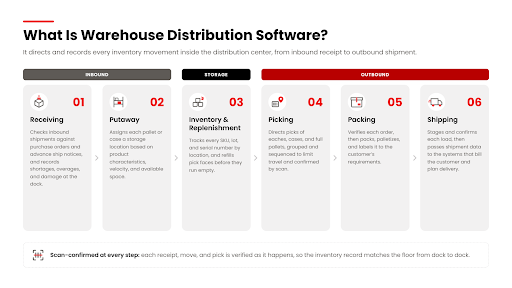
Receiving. Incoming shipments are checked against purchase orders or advance ship notices. Shortages, overages, and damage are recorded before the inventory enters the building’s records.
Putaway. The system assigns each pallet or case a storage location based on product characteristics, velocity, and available space. Location choice no longer depends on whoever happens to be driving the forklift.
Inventory control and replenishment. The system maintains a location-level record of every SKU, lot, and serial number. It triggers moves from reserve storage to pick faces before those faces run empty.
Picking. Workers receive directed tasks for eaches, cases, or full pallets, grouped and sequenced to limit travel.
Packing. Orders are verified, packed or palletized to customer specifications, and labeled.
Shipping. Loads are staged, confirmed, and documented, and shipment data passes to the systems that bill the customer and plan the delivery.
What Software Is Used in Warehouses?
Most distributors already run some form of software in the warehouse. The core is usually a warehouse management system (WMS), supported by an enterprise resource planning (ERP) platform, order or inventory management tools, and often transportation and labor management software. The more useful question is which of those systems actually directs work on the floor: where each pallet goes, when a pick face gets replenished, which orders release next. When that job falls to an ERP module, a spreadsheet, or a few experienced employees, accuracy and productivity problems tend to follow.
Dedicated Warehouse Management Systems
A dedicated WMS manages inventory at the location level and directs the tasks that move it. It decides where received goods should be stored, when a pick location needs replenishing, and which orders to release to the floor and in what sequence. Workers see each instruction on a handheld scanner or voice headset. For example, a receiver scans an inbound pallet and is told to take it to a specific reserve location. Later, a picker is sent to that location to pull four cases for a store order, and each scan confirms that the right product came from the right place.
Inventory and Order Management Platforms
Inventory and order management platforms track stock availability across locations and channels and process orders as they arrive. Their ability to direct physical warehouse work varies widely by product. Some offer basic picking lists, while others offer little beyond a stock count. A distributor that expects these platforms to manage putaway logic, replenishment triggers, or customer-specific shipping rules should confirm that support in a live demonstration rather than assume it from a feature list.
ERP Systems With Warehouse Functionality
Enterprise resource planning (ERP) systems connect warehouse activity to purchasing, finance, sales, and other business processes. Many ERPs include a warehouse module, and its depth varies considerably by product and module. Some offer location tracking and simple pick tickets. Fewer offer directed putaway, task interleaving, or wave planning. Running a distribution center entirely through an ERP is common, and it often forces warehouse staff back onto paper and manual data entry for anything the module doesn’t handle.
Transportation Management Systems
Transportation management systems (TMS) plan, execute, and track freight movement after goods leave the dock. That includes carrier selection, rate management, load tendering, and shipment visibility. A TMS depends on accurate outbound data from the warehouse, and the warehouse in turn depends on accurate pickup schedules and load plans from the TMS. The connection between the two determines whether trailers are loaded in the right sequence and leave on time.
Labor Management Systems
Labor management systems (LMS) measure worker productivity against engineered or historical standards and help supervisors plan staffing by shift and function. Some are standalone products. Others are modules within a WMS, which simplifies data collection because the tasks being measured are the same tasks the WMS directs. For distribution operations where labor is the largest controllable cost, an LMS turns productivity from an impression into a measurement.
Benefits of Warehouse Distribution Software
The benefits of warehouse distribution software come from replacing judgment calls and paper with directed, scan-confirmed work. Each benefit below follows from that change.
Warehouse Distribution Software Benefit #1: Inventory Accuracy That Holds Across the Network
Every downstream decision rests on knowing what is on hand and where. When each receipt, move, and pick is confirmed by a scan, the system record and the physical shelf stay aligned. Buyers can allocate product to stores or branches with confidence, and customer service can promise availability without calling the warehouse to check. Scan-based cycle counting builds on that accuracy. Many operations can cut back or eliminate the annual wall-to-wall count because ongoing cycle counts keep records current all year.
→ Sprouts Farmers Market saw inventory accuracy rise 32% over the same six-month period a year earlier after moving off paper-based processes.
Warehouse Distribution Software Benefit #2: Replenishment That Keeps Pace With Picking
Distribution centers lose a large share of their productivity to empty pick faces. Pickers wait or skip lines, and orders ship short. Warehouse distribution software monitors pick-location quantities against minimums and upcoming demand, then generates replenishment tasks before a shortage occurs. It can interleave those tasks with picking so that forklift operators aren’t driving empty between assignments.
→ At Sprouts, the WMS task engine let forklift operators replenish pick locations on time while store orders were being selected.
Warehouse Distribution Software Benefit #3: Traceability When It Matters Most
For food, pharmaceutical, and other regulated distributors, traceability is a requirement, not a reporting feature. Lot, serial, and expiration-date tracking at the location level lets an operation identify exactly which inventory is affected by a supplier recall, where it sits in the building, and which customers received it. A process that would otherwise take days of manual record review takes far less time with lot-level data at hand.
→ Sprouts brought produce quality control into the WMS, capturing attributes like ripeness and sugar levels, which gave buyers traceability back to the grower.
Warehouse Distribution Software Benefit #4: More Throughput From the Same Workforce
Directed work removes the walking, searching, and second-guessing that consume a manual warehouse’s labor hours. Optimized pick paths, batched assignments, and interleaved tasks let an existing team handle higher volume, which matters given that hiring and retaining warehouse staff remains difficult across the industry. Labor data from the same system shows supervisors where time is still being lost.
→ Sprouts increased picking efficiency by as much as 25% and supported higher fulfillment volumes with its existing labor.
Warehouse Distribution Software Benefit #5: Consistent Compliance With Customer Requirements
B2B customers impose specific rules on how orders are labeled, palletized, and shipped. Retailers in particular enforce those rules with chargebacks. Warehouse distribution software stores each customer’s requirements and applies them automatically during packing and shipping. Compliance then no longer depends on whether a given worker remembers a given account’s rules.
→ Industry research site retail compliance charges at approximately 0.4%–0.8% of invoice value. A 0.5% compliance penalty rate costs a company with $50 million in annual retail sales $250,000 a year.
Warehouse Distribution Software Benefit #6: Less Reliance on Tribal Knowledge
In many distribution centers, the location of slow-moving stock and the handling of a key account’s orders live in the heads of a few long-tenured employees. When those employees are out or leave, performance drops. A WMS captures that knowledge in system logic and directs every worker through the same process, so new hires become productive faster and the operation is less exposed to turnover.
→ Sid Harvey’s had been running its distribution center through its ERP, which left receiving, picking, and counting dependent on paper and manual entry. Directed workflows moved that process into the system, so it no longer depends on who is working the shift.
Features to Look for in Warehouse Distribution Software
The features that matter most are the ones that match how the operation receives, stores, and ships. Feature lists across products often look similar, so the evaluation should focus on how each capability performs against real workflows.
Real-Time Inventory Visibility and Traceability
The software should track inventory to the bin level and show quantities across every facility in the network, not only the building a user is logged into. Lot and serial tracking should be captured at receiving and carried through every move to the outbound shipment. For food distributors, expiration-date controls should enforce first-expired, first-out (FEFO) or first-in, first-out (FIFO) picking and block shipment of product that falls outside a customer’s minimum remaining shelf life.
The value becomes clear during a recall. A distributor notified that a specific lot is contaminated should be able to run one query that returns every location holding that lot, every order that included it, and every customer who received it, then place the remaining inventory on hold before another case ships.
Receiving, Putaway, and Replenishment
Receipt validation compares what arrives against what was ordered or what the supplier’s advance ship notice promised. Discrepancies are flagged at the dock rather than discovered weeks later. Directed putaway then assigns storage locations using rules for product dimensions, velocity, temperature zone, and hazardous material segregation.
Replenishment logic should move stock from reserve storage to forward pick locations based on minimum and maximum thresholds, and ideally on the demand from orders already released for picking. Together, these functions remove the radio calls, whiteboards, and supervisor walk-arounds that coordinate inbound and replenishment work in a manual building.
Picking, Packing, and Shipping
Distribution operations usually need to support three units of measure at once: eaches, cases, and full pallets. The software should direct each pick type differently, and it should support batch picking (several orders picked in one trip) and wave picking (orders released in planned groups timed to dock schedules and carrier cutoffs) where volume justifies them.
Consider a B2B order from a regional grocery customer that includes two full pallets of a fast-moving beverage SKU, 30 mixed cases from forward pick locations, and a handful of eaches. The software should send the full-pallet picks directly to a forklift operator, assign the case picks to a selector working through the pick module, and consolidate everything at a staging lane matched to the outbound door. Each step requires verification scans, and the system should then generate the customer-specific labels and documentation that account requires. 3PL operations add another layer, because each client’s inventory and shipping rules must stay separate within the same building.
Barcode Scanning and Mobile Warehouse Tools
Scanning is what turns software instructions into confirmed transactions. Workers should scan during receiving, every inventory move, picking, and shipping, using rugged handhelds, wearable scanners, or voice-directed systems. GS1-128 barcodes are the standard for case and pallet labeling in general distribution. They can encode product identifiers alongside batch or lot numbers, serial numbers, and expiration dates in a single scan. Buyers should confirm which barcode formats and data fields a system reads and prints, especially if suppliers or customers require specific label formats.
Radio frequency identification (RFID) is worth evaluating only where it is relevant and supported. Examples include high-value goods, returnable containers, or customers that mandate it. For most distribution operations, barcode scanning remains the foundation.
ERP, Ecommerce, and Transportation Integrations
Warehouse distribution software has to exchange data with the systems around it. The ERP sends purchase orders, sales orders, and item master data, and it receives receipt confirmations, inventory adjustments, and shipment confirmations. Ecommerce and order management platforms need current inventory availability and order status. Transportation systems need shipment weights, dimensions, and pallet counts, and they return carrier assignments and tracking information.
Integration scope deserves direct questions. Buyers should ask which integrations are prebuilt, which require custom development, how often data synchronizes, and whether the vendor, the ERP provider, or the buyer’s own IT team is responsible for building and maintaining each connection.
Reporting, Labor, and Automation Support
Operational reporting should give supervisors the measures they actually manage to, such as picking accuracy, order processing time, dock-to-stock time, and inventory accuracy by zone. Labor reporting should show productivity by worker, task type, and shift. Automation compatibility covers conveyors, sortation systems, autonomous mobile robots, and goods-to-person systems. It matters now for some operations and will matter later for most.
Buyers should clarify which of these capabilities are included in the core product and which require an additional module, a separate license, or a connected system such as a warehouse execution system or warehouse control system.
Read More: Tips to Getting the WMS Selection Right
How to Choose Warehouse Distribution Software
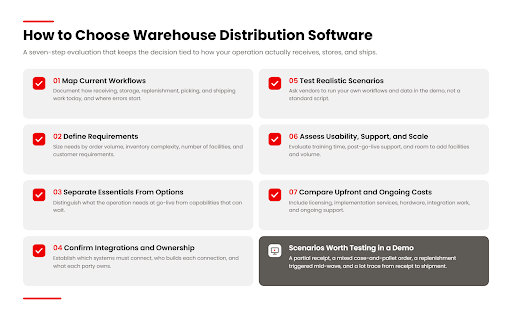
The right warehouse distribution software is the one that fits the operation’s actual workflows, not the one with the longest feature list. A structured evaluation keeps the decision tied to those workflows:
- Identify current problems and map warehouse workflows. Document how receiving, storage, replenishment, picking, and shipping work today, including the workarounds, and note where errors and delays originate.
- Define requirements by order volume, inventory complexity, facilities, and customer needs. Units of measure, lot and expiration tracking, temperature zones, number of sites, and customer compliance rules all shape what the system must do.
- Separate essential features from optional capabilities. Distinguish what the operation needs at go-live from what would be useful in two years. This keeps the evaluation focused and the initial scope manageable.
- Confirm integrations and implementation responsibilities. Establish early which systems must connect, who builds each connection, and what each party owns.
- Test realistic scenarios during demonstrations. Ask vendors to run the operation’s own scenarios rather than a standard script.
- Assess usability, training, vendor support, and scalability. Evaluate how quickly a new worker can learn the handheld screens, what support looks like after go-live, and whether the system can add facilities and volume without re-implementation.
- Compare upfront and ongoing costs. Include licensing or subscription fees, implementation services, hardware, integration work, and ongoing support in a total cost comparison.
Demonstrations are where evaluations succeed or fail. Useful scenarios include a partial receipt against a purchase order, a mixed case-and-pallet order shipping to a customer with specific labeling requirements, a replenishment triggered mid-wave, and a lot trace from supplier receipt to customer shipment. A vendor that can run these cleanly with the buyer’s data is showing real capability. A vendor that redirects to a scripted demo is showing something else.
Requirements differ by scale. A small distributor running one building may need strong core functionality, a straightforward ERP connection, and a system that its existing team can learn quickly. A larger operation with several facilities, multiple temperature zones, and demanding retail customers needs deeper configurability, labor management, automation support, and network-wide inventory visibility. In both cases, the system should support growth without forcing a replacement when the business adds a building or a channel.
What Does Implementation Involve?
Implementing warehouse distribution software involves configuring the system to the operation’s workflows, preparing data, connecting surrounding systems, training staff, and supporting the go-live. The main steps are:
Requirements review and workflow configuration. The vendor and the operations team confirm how each process should run and configure the system’s rules to match.
Inventory and master-data preparation. Item masters, location definitions, units of measure, and customer requirements are cleaned and loaded. Inaccurate master data is the most common source of early problems.
Integration setup. Connections to the ERP, order management, transportation, and any automation are built and tested with realistic data volumes.
Testing and staff training. End-to-end scenarios are run before go-live, and supervisors and floor staff are trained on the workflows they will actually perform.
Go-live and ongoing support. The system goes live, typically with the vendor on site or closely engaged, followed by a stabilization period and ongoing support.
Timelines depend on the operation’s size and complexity, the number of integrations, and the condition of the existing data. A single-site distributor with a standard ERP connection and a multi-facility operation with automation are different projects. Buyers should confirm exactly which services are included in the vendor’s quote, which tasks fall to their own team, and what post-go-live support covers.
Warehouse Distribution Software Examples
Here are two distributors that moved off paper and ERP-only processes, and what changed.
Example #1: Sprouts Farmers Market
Sprouts Farmers Market, the Phoenix-based grocery chain known for fresh produce and natural and organic foods, outgrew paper-based warehouse processes once it reached about 40 stores. Its next-day delivery commitment to stores put additional pressure on inventory accuracy, labor efficiency, and quality control for perishable products.
Sprouts implemented Made4net’s WarehouseExpert™ with mobile RF scanners across distribution centers ranging from 80,000 to 120,000 square feet. Each pallet received a license plate number (LPN) barcode label. Quality control for produce moved into the WMS, capturing attributes such as sugar levels and ripeness and giving buyers better insight into grower performance and traceability. Forklift operators relied on the system’s task engine to move full pallets to shipping and replenish pick locations on time. The system also built pallets to optimal size and weight for store delivery.
Sprouts recorded:
- Improved inventory accuracy, up 32% over the same six-month period a year earlier
- Increased picking efficiency of as much as 25%
- Higher fulfillment volumes supported with existing labor
- More accurate store orders and lower distribution costs
Sprouts has since grown to more than 380 stores with approximately 31,000 team members.
“For the first time, Sprouts could efficiently replenish products while simultaneously selecting store orders, which has improved productivity among our warehouse staff.”
— Vice President of Supply Chain, Sprouts Farmers Market
Example #2: Sid Harvey’s
Sid Harvey’s, an HVACR distributor, supplies more than 50,000 SKUs to a network of 80 branches from its Wilkes-Barre, Pennsylvania distribution center. The company had been running the distribution center through its ERP system, which left receiving, picking, and inventory counting dependent on paper and manual data entry. The result was inventory errors, slower operations, and limited real-time visibility across locations.
Sid Harvey’s implemented Made4net’s WarehouseExpert, which integrated with its existing ERP and automated receiving, directed putaway, picking, and inventory counting. The company gained inventory visibility and traceability from vendor to branch. Ongoing cycle counting positioned it to eliminate its annual multi-week wall-to-wall physical inventory.
Sid Harvey’s saw:
- Improved accuracy across receiving, picking, and inventory management
- Faster operations, getting product to branches more quickly
- Real-time visibility into stock levels for better allocation decisions
- A scalable platform that grows with the business
“Made4net has provided us with a powerful WMS that has streamlined all of our processes, improved productivity, and integrated seamlessly with our existing systems.”
— Dave Hartz, General Manager, Sid Harvey Industries
Frequently Asked Questions
How much does warehouse distribution software cost?
Cost varies widely, and the license price is only part of it. The main drivers are:
- Licensing model. Subscription (priced per user, per site, or per transaction volume) versus a perpetual license with annual maintenance.
- Implementation services. Workflow configuration, data migration, testing, and go-live support. For many projects this is a meaningful share of the total.
- Hardware. Handheld scanners, label printers, vehicle-mount terminals, and wireless coverage in the building. Buyers often forget to budget for these.
- Integrations. Prebuilt ERP connectors cost less than custom development.
- Training and support. Initial training, plus ongoing support terms after go-live.
A warehouse management system (WMS) typically costs anywhere from $50,000 to over $2 million in the first year. The more useful comparison is total cost over three to five years, not the first-year quote. Ask every vendor to price the same scenario so the numbers are comparable.
How long does it take to implement warehouse distribution software?
Made4net’s standard implementation timeframe is 20 weeks, whereas other vendors can take nine months to a year, or longer. Three things move that number the most:
- Data quality. Clean item masters and accurate location definitions speed everything up. Messy data is the most common cause of delays.
- Integration scope. A single ERP connection is a different project from an ERP, TMS, and automation rollout.
- Number of sites. Many distributors go live at one building first, then roll out to the rest of the network.
Ask vendors for a timeline that shows who owns each task. Slippage usually comes from the buyer’s side (data, IT availability, staff training time), so the plan should make those dependencies visible.
What is the difference between a WMS and an ERP warehouse module?
An ERP connects warehouse activity to purchasing, finance, and sales. Its warehouse module can track stock by location and print pick tickets, but depth varies a lot by product. A WMS is built to direct the work itself: where each pallet goes, when a pick face needs replenishing, and which orders get released to the floor and in what sequence.
Many distributors run both. The ERP stays the system of record for orders and finances, and the WMS runs the floor and sends confirmations back. The warning sign that an ERP module is no longer enough is workers falling back on paper or manual data entry for anything the module can’t handle.
What is the most popular warehouse management software?
No single WMS is the most popular across the market, because the leaders differ by segment. Large enterprise retailers and manufacturers often run broad enterprise suites. Mid-market distributors tend to look at vendors focused on distribution and complex fulfillment. 3PLs usually need multi-client capabilities such as client-level billing and inventory separation. Within each group, fit with your workflows, ERP, and growth plans matters far more than market share. A shortlist of three to five vendors in your segment, each tested against your own scenarios, will tell you more than any popularity ranking.
Find the Right Software for Your Distribution Operation
Choosing warehouse distribution software starts with the warehouse, not the software. The operations that get the most from a new system are the ones that map their workflows honestly, define requirements around how they actually receive, store, and ship, confirm integrations and responsibilities before signing, and compare total cost over the life of the system rather than the initial quote. The right choice is one that fits today’s operation and can absorb the next facility, channel, or major customer without starting over.
The distributors in this guide illustrate what that fit looks like in practice. Sprouts Farmers Market used Made4net’s WarehouseExpert™ to bring control and traceability to perishable inventory across a growing distribution network. Sid Harvey’s moved its distribution center off ERP-driven paper processes and onto directed, scan-confirmed workflows. Each project relied on the same strengths: configurability for distribution-specific workflows, integration with existing business systems, and an interface that warehouse staff adopt quickly.
To see how WarehouseExpert™ handles your receiving, replenishment, and picking scenarios, request a demo and bring your toughest workflows.