Today’s consumers expect faster, more reliable, and increasingly personalized delivery experiences—putting pressure on logistics teams at every level. Last-mile delivery software is no longer a futuristic luxury; it’s an essential link in a responsive supply chain. For operators looking to boost efficiency, control costs, and delight customers, leveraging the right technology for last-mile delivery is a strategic priority.
To better understand the importance of last-mile delivery, this article will cover:
- What is Last-Mile Delivery?
- Why is Last-Mile Delivery Important?
- What is Last-Mile Delivery Software?
- What is the Difference Between Last-Mile Delivery Software and Route Optimization Software?
- Who Should Use Last-Mile Delivery Software?
- How Does Last-Mile Delivery Software Work With a WMS?
- Key Features For Last-Mile Delivery Software
- Benefits of Last-Mile Delivery Software
- Why is Efficient Last-Mile Delivery Important?
- Challenges to Avoid in Last-Mile Delivery
- How to Choose the Right Last-Mile Delivery Software For Your Needs
- Next Steps: See DeliveryExpert on Your Routes
What is Last-Mile Delivery?
Last-mile delivery is the final leg of an order’s journey: moving goods from a warehouse, store, or hub to the customer’s door, a retail location, or a pickup point. It’s the part of fulfillment the customer actually sees, and it tends to be the costliest and least predictable.
That’s because the last mile is where plans meet reality. Delivery windows are tight, city stops are dense, rural routes are long, and recipients aren’t always home. Every missed window or failed first attempt adds cost.
Why is Last-Mile Delivery Important?
Cost is the first reason. The last mile is often cited as more than half of total shipping costs, and it’s hard to control: dense stops, traffic, rising labor costs, and demand that doesn’t follow the forecast.
It’s also where customers form their opinion of you. Radial’s 2025 Peak Season Consumer Survey of 1,000 U.S. shoppers indicated that 62% said faster shipping is the deciding factor between similarly priced, in-stock retailers, and 30% now expect 2 to 3 day delivery as standard, up from 19% in 2023. Certainty matters as much as speed: two-thirds said they would give up a 5% discount for guaranteed delivery, and 85% check their package status at least every few days.
The same expectations apply in B2B. A store manager, restaurant, or job site needs a reliable arrival window, and finance needs proof of delivery quickly so invoices can go out. Done well, last-mile delivery builds repeat business. Done badly, it shows up as failed deliveries, returns, and “where is my order?” calls.
What Is Last-Mile Delivery Software?
Last-mile delivery software, also called a final-mile delivery platform, manages that final leg of an order’s journey, from warehouse, store, or hub to the customer.
In many operations, the last mile still runs on spreadsheets, paper manifests, and phone calls. Last-mile delivery software replaces that with five connected functions:
- Route planning: sequences stops around delivery windows and vehicle capacity.
- Assignment: matches each route to an available driver and sends instructions to their mobile device.
- Tracking: shows where every vehicle is against its plan.
- Communication: alerts dispatchers to exceptions and gives customers accurate arrival times.
- Proof of delivery: captures signatures, photos, and timestamps that confirm what arrived, when, and to whom.
The bigger payoff comes from connecting it to your WMS, TMS, or ERP. Delivery then stays part of the same order record instead of a separate step that starts after the truck leaves. A failed delivery, for example, can update inventory and alert customer service without anyone re-keying it.
What Is the Difference Between Last-Mile Delivery Software and Route Optimization Software?
The difference is planning versus execution. Route optimization software decides which vehicles serve which stops, in what sequence, and within what constraints. Last-mile delivery software manages what happens once those routes are on the road: dispatch, driver instructions, live tracking, proof of delivery, and exception handling.
Route optimization works through the constraints that make a plan feasible and cost-effective: time, distance, traffic, tolls, vehicle capacity by weight and cube, customer delivery windows, service times at each stop, and site access restrictions. Its output is a plan, built before the first truck leaves and adjusted as orders and conditions change.
Last-mile delivery software carries that plan out, then measures what actually happened against what was planned. Many last-mile platforms include basic routing. Operations with large fleets, multiple depots, or complex constraints often add dedicated route optimization to build the plan itself. The line blurs during the day: when a stop fails or a rush order lands, re-sequencing a route can happen on either side, depending on the tools.
The two work best together. An optimized plan is only as good as its execution, and flawless execution of a poor plan is still expensive. When planned-versus-actual results feed back into future routing, each cycle starts from better data on service times, delays, and failed stops.
Who Should Use Last-Mile Delivery Software?
Last-mile delivery software fits any organization that runs its own final-mile deliveries and needs to manage, track, and prove them at scale. That includes:
- Retailers and e-commerce businesses running private fleets or store-based fulfillment.
- Wholesale distributors and food and beverage companies running multi-stop or direct-store-delivery routes.
- Manufacturers delivering to job sites or customer facilities.
- Third-party logistics providers that offer delivery as a value-added service. Their clients increasingly expect the same visibility and proof of delivery they would get from their own fleet.
- Sellers of large or bulky goods, such as furniture and appliances, where delivery windows and scheduling drive the customer experience.
Some operational signals suggest the need has already arrived:
- Dispatchers build routes in spreadsheets.
- Proof of delivery is paper-based and slow to reach billing.
- Customer service spends much of its day answering “where is my order?” calls.
- Failed deliveries happen, but no one can say why.
- Volume can’t grow without adding drivers.
How Does Last-Mile Delivery Software Work With a WMS?
Last-mile delivery software and a WMS exchange order and shipment data in both directions. The WMS prepares orders for delivery, and the delivery software executes and confirms them. The dividing line is the dock scan: everything before it is warehouse preparation, and everything after is delivery execution.
The workflow typically follows six steps:
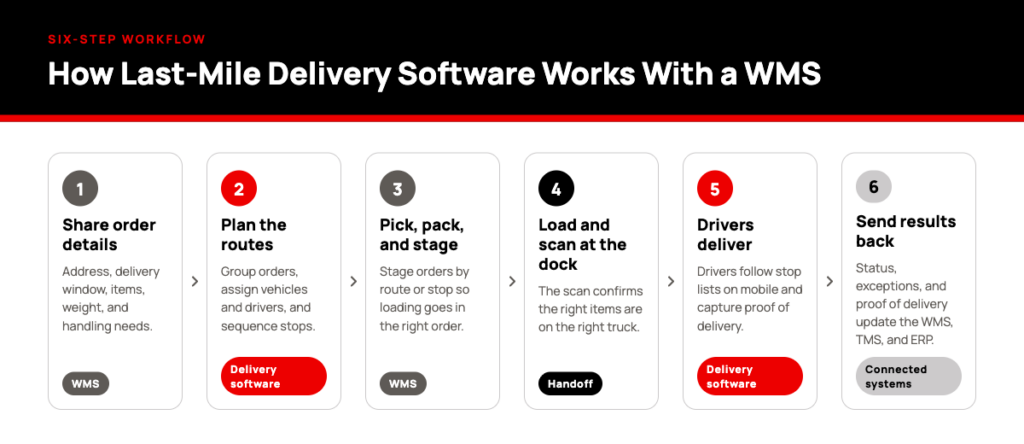
- The WMS shares order details with the delivery software. When orders are released for fulfillment, the WMS sends what delivery planners need: customer and delivery address, requested delivery date or window, items and quantities, weight and cube, and any special handling instructions.
- Delivery planning builds the routes. Orders are grouped into routes, assigned to vehicles and drivers, and sequenced to meet delivery windows. Planning can start before picking is finished, using estimated weight and cube, and the plan is adjusted once actual packed dimensions are known.
- Warehouse teams pick, pack, and stage. The WMS directs this work as it would for any outbound order. With the route plan in hand, orders can be staged by route or by stop so loading moves quickly and in the right sequence.
- Loading and the dock scan hand the order off. Trucks are ideally loaded in reverse delivery order, so the first stop’s goods sit nearest the door. Scanning at the dock confirms the right items are on the right truck. This is the handoff between the two systems.
- Drivers deliver from their mobile devices. Each driver receives a stop list with addresses, customer notes, item details, and delivery instructions, plus any changes dispatch makes during the day. At each stop, the driver records the outcome (delivered, partially delivered, refused, damaged, or failed) and captures proof of delivery such as a signature, photo, timestamp, and location.
- Results flow back to the connected systems. Delivery status, exceptions, and proof of delivery return to the WMS and other connected systems, such as a TMS or ERP. Customer service, billing, and operations all get a current view of every order.
What happens to that returned data depends on how the systems are integrated:
- In some setups, a confirmed delivery updates the order status and closes the shipment record automatically.
- In others, exceptions such as refused or damaged goods require a receiving step at the warehouse before inventory is adjusted.
Key Features For Last-Mile Delivery Software
The five functions described earlier show up in practice as nine features. These are the ones to look for when evaluating a platform.
Last-Mile Delivery Software Feature #1: Route Planning and Optimization
Route planning sequences stops and assigns them to vehicles around delivery windows, vehicle capacity, traffic, and distance, covering pickups as well as drop-offs. Planners load the day’s orders, review the routes the system proposes, and adjust where local knowledge calls for it. Routes can be recalculated during the day as orders arrive or conditions change. Platforms vary here: some build routes natively, others take a plan from a dedicated route optimization tool.
For example, a foodservice distributor gets a rush order from a restaurant after the trucks have left. Rather than sending a second vehicle, the system inserts the stop into the route of a truck passing nearby that has room on board, with minimal impact on that driver’s remaining delivery windows.
Last-Mile Delivery Software Feature #2: Automated Dispatching
Automated dispatching assigns stops and orders by driver location, load, and availability, replacing the morning job of matching drivers to routes by hand. Dispatchers review the assignments, approve or adjust them, and push them to drivers’ mobile devices. When something changes, the system proposes reassignments instead of leaving dispatch to rebuild the plan.
For example, a driver calls out sick before trucks are loaded. The system redistributes their stops across drivers with capacity on compatible routes, and updated stop lists reach their devices before they leave the yard.
Last-Mile Delivery Software Feature #3: Driver Mobile App
The driver mobile app guides drivers through each route, from loading to final confirmation. It’s where delivery execution actually happens, and where several of the features below are carried out. Drivers scan items to confirm the right goods reach the right customer, and the app shows stop details, customer notes, and delivery instructions. The strongest apps keep working offline when connectivity drops.
For example, a driver on a rural route loses cell coverage for an hour. Deliveries, signatures, and photos keep being captured on the device and sync once the connection returns.
Last-Mile Delivery Software Feature #4: Live Tracking
Live tracking uses AVL (automatic vehicle location) to show where each vehicle is against its planned route. Dispatchers follow progress on a live map or dashboard, and estimated arrival times update as conditions change. Customer service can answer status questions without calling the driver.
For example, a customer calls to ask when a sofa will arrive. The agent sees the truck is two stops away and gives an accurate arrival window in seconds.
Last-Mile Delivery Software Feature #5: Customer Notifications
Customer notifications are triggered automatically by delivery events: scheduling, departure, approaching arrival, and confirmed delivery. They cut inbound status calls and give customers what they need to be available at the delivery point.
For example, a home delivery customer gets a message that the truck is three stops away and makes sure someone is home, which prevents a failed attempt and a second trip.
Last-Mile Delivery Software Feature #6: Exception and Delay Management
Exception and delay management flags problems as they happen, not after the truck returns. Rules define what counts as an exception, such as a driver running behind, a missed delivery window, a refused delivery, or a wrong address. When one occurs, the system alerts dispatch, prompts the driver to record a reason, and routes the issue to the right team.
For example, a driver arrives at a business that has closed for the day. They log a failed attempt with a reason code, dispatch is alerted, the customer is notified, and the order can be rescheduled that afternoon.
Last-Mile Delivery Software Feature #7: Proof of Delivery (POD)
Electronic proof of delivery captures digital signatures, photos, timestamps, and location data, and supports contactless confirmation. The driver records it at each stop and it attaches to the order immediately, so billing, customer service, and operations see it the moment the delivery is complete instead of waiting for paperwork to return with the truck.
For example, a customer reports a damaged pallet. The photo taken at drop-off shows it intact and properly wrapped, and the dispute is resolved quickly.
Last-Mile Delivery Software Feature #8: WMS, TMS, and ERP Integration
Integration connects delivery to the systems that run the rest of the order. Orders flow into delivery planning without re-entry, and outcomes flow back for status updates, customer communication, and invoicing. For the step-by-step exchange, see how last-mile delivery software works with a WMS.
For example, a distributor that invoices on confirmed delivery can trigger the invoice as soon as proof of delivery reaches its ERP, instead of waiting days for signed paperwork to be collected and keyed in.
Last-Mile Delivery Software Feature #9: Reporting and Analytics
Reporting and analytics turn delivery data into performance insight. Core metrics include on-time delivery rate, failed deliveries and repeat attempts, and driver productivity measures such as stops per hour, time on site, and miles driven. Teams use them to separate one-off problems from recurring ones, drilling into results by route, day of week, customer, or driver to find patterns that daily firefighting hides.
For example, one route is repeatedly late. Analysis traces it to a single customer site where receiving restrictions create long waits. The fix is to adjust the planned service time for that stop or move it earlier in the sequence, not to push the driver to go faster.
Benefits of Last-Mile Delivery Software
Implementing advanced delivery software unlocks tangible value across the supply chain, including:
Last-Mile Delivery Software Benefit #1: Cost Savings
Smart routing and efficient loading reduce fuel and labor costs, savings that can be passed on to customers. Fewer miles, fewer idle hours, and fewer repeat attempts lower the cost of every delivery, and the savings compound across each route and each day.
Last-Mile Delivery Software Benefit #2: Increased Shipment Visibility
Real-time dashboards and tracking elevate operations management and lead to increased customer trust. Dispatchers can see problems developing and act before a delivery window is missed, rather than learning about issues after the fact.
Last-Mile Delivery Software Benefit #3: Improved Customer Satisfaction
Faster, accurate deliveries and proactive communication help turn first-time buyers into loyal advocates. Customers who know when to expect an order, and receive it when promised, have little reason to call or look elsewhere.
Last-Mile Delivery Software Benefit #4: Productivity and Scalability
Automation allows businesses to handle more orders while onboarding new drivers or routes seamlessly. Guided mobile workflows shorten the learning curve for new drivers, and automated planning absorbs volume increases without a matching increase in dispatch staff.
Last-Mile Delivery Software Benefit #5: Reduced Paperwork
Electronic POD minimizes manual errors and simplifies documentation. Records are captured once, at the point of delivery, and are immediately available to everyone who needs them.
Together, these benefits show why last-mile delivery software is becoming a must-have for modern supply chains.
Why is Efficient Last-Mile Delivery Important?
Efficient last-mile delivery matters because the final leg is where small inefficiencies multiply. An extra mile, a poorly sequenced stop, or a failed attempt repeats across every route, every driver, and every day, so the cost adds up faster here than anywhere else in the order journey. As mentioned earlier in the post, the last mile is often cited as more than half of total shipping costs.
Earlier stages of the supply chain move freight in consolidated loads. The last mile breaks those loads into individual stops, each with its own address, access constraints, and service time. Labor is usually the largest cost, so every minute a driver spends idling, backtracking, or waiting at a closed dock is paid for without producing a delivery.
Failed deliveries show the problem most clearly. A second attempt can use nearly as much driver time, fuel, and vehicle capacity as the first, yet it generates no additional revenue. It also tends to bring customer service contacts, rescheduling work, and sometimes a return trip to the warehouse.
Efficiency also sets capacity. An operation that fits more stops into each route can absorb growth and seasonal peaks without adding trucks or hiring drivers.
Speed and efficiency are not the same thing. Tighter delivery promises shrink the time available to consolidate orders and plan routes, which tends to raise cost per delivery. Companies that promise faster service without the discipline to run it efficiently end up trading margin for speed. Efficiency is what makes fast delivery sustainable.
Challenges to Avoid in Last-Mile Delivery
Last-mile delivery can be a major differentiator for customer satisfaction—but it’s not without its hurdles. As Amit Levy, EVP of Sales and Strategy at Made4net says, “The last mile is where promises meet reality—and that’s where most companies feel the squeeze.”
Some common challenges include:
- Traffic and route disruptions: Even the best-planned routes can be thrown off by congestion or last-minute order changes.
- Failed deliveries: Wrong addresses, missed time slots, or unavailable customers aren’t just frustrating—they cut into margins.
- Siloed data: When systems don’t talk to each other, delays, lost inventory, or order mix-ups can quickly pile up.
- Rising costs: Labor, fuel, and vehicle maintenance can spiral if you’re not constantly optimizing operations.
- Customer expectations: “Customers expect real-time updates, not vague guesses,” Levy notes. Missing ETAs or slow communication can erode trust fast.
It’s worth remembering that last-mile delivery software isn’t a magic fix. But it does give teams the flexibility to pivot on the fly, so when the unexpected happens, operations can bounce back—and customers stay happy.
How to Choose the Right Last-Mile Delivery Software For Your Needs
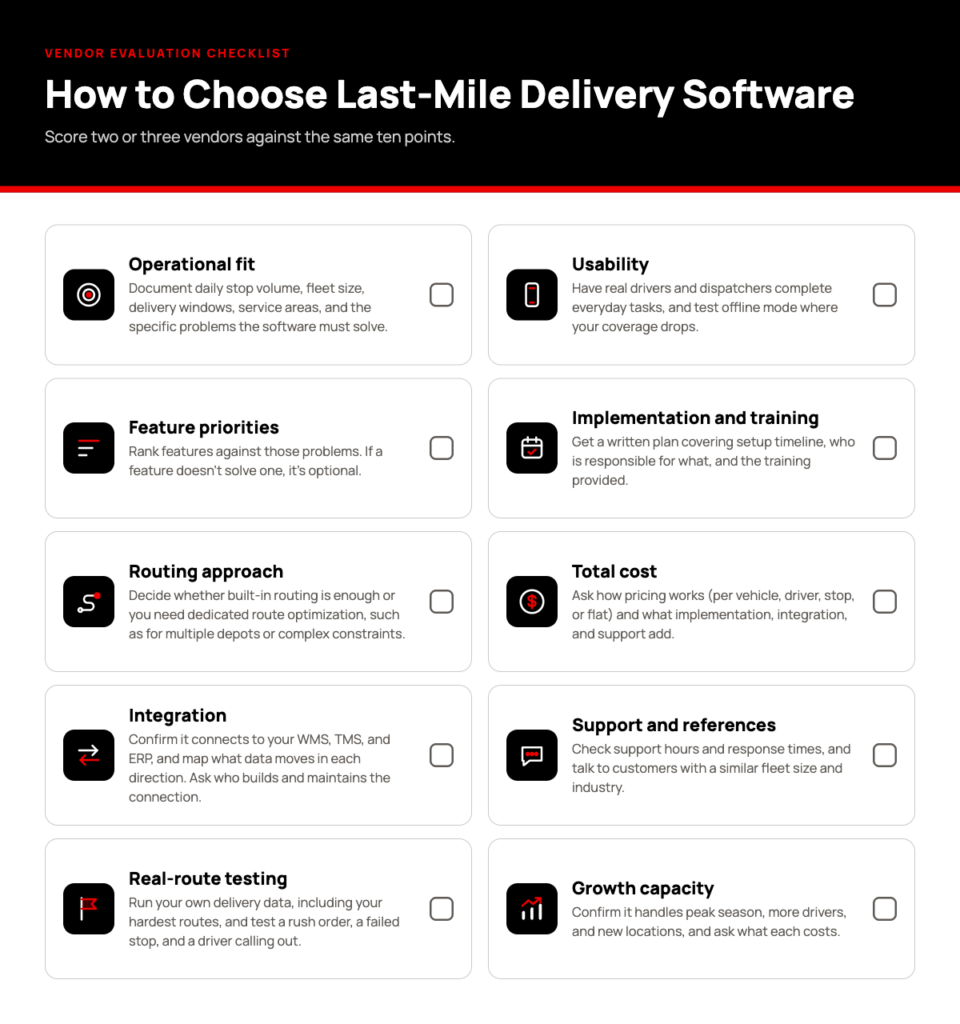
Start with your own operation, not a vendor’s feature list. Fleet size, stops per route, delivery windows, and the systems you already run determine what you need and what you can skip. Then test candidates against your real data, because every platform looks good on a clean demo route. Score two or three vendors against the same list:
Next Steps: See DeliveryExpert on Your Routes
Customers keep raising the bar on delivery, and the operations that keep up can plan, track, and prove every delivery on the same record as the order. Whichever platform you evaluate, test it on your hardest routes, your rush orders, and your failed stops, not a clean demo route.
Made4net’s DeliveryExpert is built for that kind of operation. It covers shipment scheduling, scanning, and loading, real-time fleet tracking, and paperless delivery with digital signatures. It runs on the same SCExpert platform as Made4net’s WMS, so delivery stays tied to the order, and drivers work from a mobile app that runs online or offline on Android.
Book a DeliveryExpert demo and bring a real route, including the hard ones.